Can I use Suno songs on YouTube?
Can I use Suno songs on YouTube? On the free plan, only where you don't earn. Suno's help centre says free-plan songs "cannot be monetized" and can't go to "a monetizing YouTube channel" (read 15 Nov 2026), and the free plan now downloads 0 songs anyway. Paid plans grant commercial rights to songs downloaded while subscribed. In Veena you own the Output you generate on every plan, and the free plan exports it with no cap, ready for your channel.
Veena is an AI DAW with a personal music producer built in. Describe the song you want and CoProducer builds it with you — beats, chords, melody, arrangement and mix — as real tracks you can edit, mix and export. Free, in your browser.
Can I use Suno songs on YouTube? What Suno's own pages say
Read from help.suno.com on 15 Nov 2026:
- Free means non-commercial. "Songs made on the free plan are only intended for personal, non-commercial use. These songs cannot be monetized, but can be shared using your Suno link."
- YouTube is named. On free, you "cannot sell the material, distribute it to earning platforms like Spotify or a monetizing YouTube channel, etc."
- Paid grants rights, per download. "Songs downloaded while subscribed are granted commercial use rights."
- No back-dating. Subscribing "does not give you retroactive commercial use licensing for the songs made with a free plan by default."
- Free downloads are gone. "Free plan users receive 0 download credits, with the ability to purchase downloads. Trial downloads are not eligible for commercial use."
Who owns what, plan by plan, is in who owns Suno songs, and every case against Suno is dated in the Suno lawsuit.
Music for your channel: Veena vs Suno
| Read 15 Nov 2026 | Veena | Suno |
|---|---|---|
| Monetized YouTube on the free plan | Yes, you own the Output | No |
| Who owns a free-plan song | You | Suno |
| Downloads on the free plan | No cap | 0 |
| The song as separate tracks you edit | Yes, every part | Studio, on Premier |
Make music for a YouTube video, in Veena
- Sign in. Open daw.veena.studio and sign in with Google. No download, no install.
- Start blank. Create a new project and paste the prompt at the bottom of this page into CoProducer.
- Pick your parts. Drums, piano, bass and flute each arrive as 3 options. Hover to hear, press Enter to keep one.
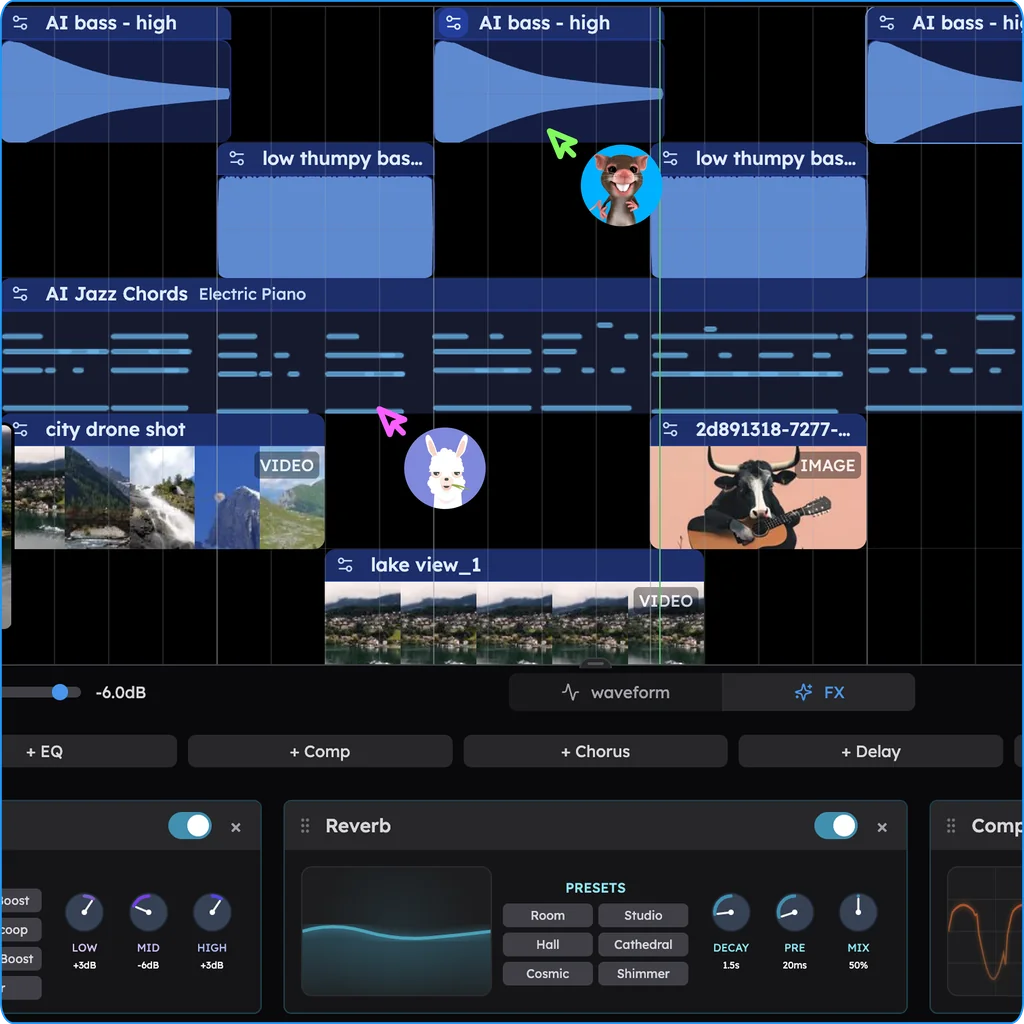
- Fit it to the video. Drag your video onto the timeline, then trim, mute or pull down parts under the voice-over.
- Export it. Download the mix as WAV or MP3, or MP4 with your video, and upload it to your channel.
What's free in Veena
- Ownership: you own the Output you generate, on every plan.
- CoProducer: a daily allowance of requests. Picking or skipping options does not use it.
- Video: import MP4, MOV and WebM, score to picture, and export MP4.
- Export: WAV 24-bit/48 kHz, MP3 320 kbps, MIDI and stems, with no cap and no watermark.
- The studio: timeline, piano roll, Beat Maker, mixer, recording and real-time collaboration, with up to 5 projects at a time.
Veena Pro, $20 a month, removes the daily request cap and unlocks the premium models.
Leaving Suno for good? Our Suno alternative guide covers every route out, video in Veena covers scoring to picture, and the Veena help centre answers the rest.
Make a 90 BPM chill hip-hop instrumental in C minor for a YouTube video: 4-bar intro, 16-bar main loop, 8-bar breakdown, 16-bar main loop, 4-bar outro. Soft boom bap drums with a brushed snare, mellow jazz piano chords, an upright-style bass line and a gentle flute melody that enters in the second loop.
Related reading: Suno alternative · Who owns Suno songs? · Suno lawsuit · Video in Veena
Try this in Veena
Make a 90 BPM chill hip-hop instrumental in C minor for a YouTube video: 4-bar intro, 16-bar main loop, 8-bar breakdown, 16-bar main loop, 4-bar outro. Soft boom bap drums with a brushed snare, mellow jazz piano chords, an upright-style bass line and a gentle flute melody that enters in the second loop.
Frequently asked questions
Can I use Suno songs on YouTube?
Not to earn, on the free plan: Suno's help centre says free-plan songs can't go to "a monetizing YouTube channel"; paid plans grant commercial rights (read 15 Nov 2026). Veena is an AI DAW with a personal music producer built in. Describe the song you want and CoProducer builds it with you — beats, chords, melody, arrangement and mix — as real tracks you can edit, mix and export. Free, in your browser.
Can I monetize a Suno song on YouTube if I subscribe later?
Not one made on the free plan. Suno's help centre says subscribing "does not give you retroactive commercial use licensing for the songs made with a free plan by default" (read 15 Nov 2026). In Veena there is nothing to buy back: you own the Output you generate on every plan, including the songs you made on the free one.
Can I download a Suno song for my video for free?
No. Suno's help centre says free plan users receive 0 download credits and that trial downloads are not eligible for commercial use (read 15 Nov 2026). Veena exports every song you make on the free plan as WAV, MP3, stems or MIDI, and as MP4 when your project holds the video, with no cap and no watermark.
Who owns a song I made on Suno's free plan?
Suno does. Its help centre says "we retain ownership of the songs you generate" on the free plan, with non-commercial use allowed (read 15 Nov 2026). In Veena you own the Output you generate, free plan included, and CoProducer builds each part as a track you edit.
How do I make background music for YouTube for free?
In Veena. Describe the mood, tempo and length in one message and CoProducer builds drums, chords, bass and melody as separate tracks. Pull a part down under your voice-over, drop your video onto the timeline to score to picture, and export the WAV, MP3 or MP4 on the free plan.
Meet your personal music producer
Free, in your browser. Describe the song you want and CoProducer builds it with you.
Make music free