Which app can I use to create a beat?
Which app can I use to create a beat? Veena. It is a free beat-making app in your browser and on your phone, with a personal music producer, CoProducer, built in: describe the beat and CoProducer builds the drums, 808 and melody with you as real tracks, then you shape every hit in the Beat Maker. Nothing to install, no app store, and the beat exports as WAV, MP3, MIDI or stems with no cap and no watermark.
Veena is an AI DAW with a personal music producer built in. Describe the song you want and CoProducer builds it with you — beats, chords, melody, arrangement and mix — as real tracks you can edit, mix and export. Free, in your browser.
Create a beat in Veena, step by step
1. Open Veena. Go to daw.veena.studio and sign in with Google. On a laptop the full studio opens; on a phone, Pocket Studio opens the same project.
2. Start a project. From Your Projects, open New Project.
3. Describe the beat. Type it the way a producer would:
Make a 90 BPM boom bap beat in D minor: 4-bar intro, 16-bar loop, 8-bar break, 16-bar loop. Boom Bap kit drums with a dusty swing, an Upright Piano chop, a Round Bass line locked to the kick and a Vox Pad in the break.
4. Pick each part. Every part arrives as 3 options. On a laptop, hover a card to hear it and press Enter; on a phone, tap a chip to hear it in the mix, then Select and Continue.
5. Shape the drums. On a laptop, open the drum clip in the Beat Maker step sequencer to move hits, or swap to any of the 8 kits. On the phone, ask CoProducer: "busier hi-hats in the second loop".
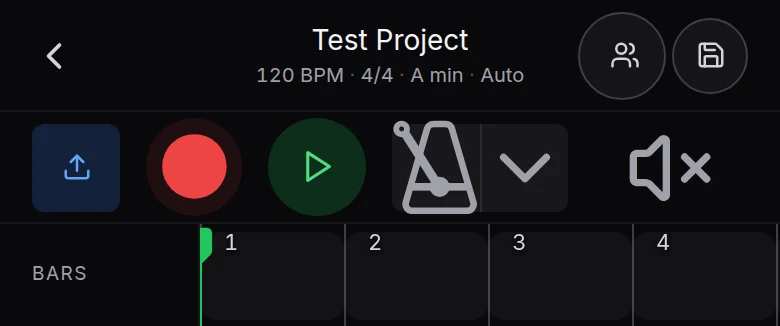
6. Record over it. Press record to add a vocal or a hook. On a phone, the record button sits in the transport.
7. Export. On a laptop, choose Export from your avatar menu; on a phone, tap the title for the Project sheet and choose Export.
What's free
- CoProducer: a daily allowance of requests. Picking or skipping options does not use it.
- Beat tools: Beat Maker, 8 sampled drum kits, six 808s among 61 instrument presets, a 16-pad sampler and 17 built-in effects, with up to 5 projects at a time.
- On your phone: Pocket Studio, the same project as on your laptop.
- Export: WAV 24-bit/48 kHz, MP3 320 kbps, MIDI and stems, with no cap and no watermark.
Veena Pro, $20 a month, removes the daily request cap and unlocks the premium models.
Beat-making apps compared
| As of October 2026 | Veena | BandLab | Soundtrap | FL Studio Mobile | Amped Studio |
|---|---|---|---|---|---|
| Price | Free | Free; AI tools $14.99 a month | Free; stems on $20.99 a month | $14.99 plus in-app purchases | Free Starter |
| On a phone | Pocket Studio, in the browser | iOS and Android apps | iOS and Android apps | iOS and Android | Not documented |
| A producer that builds the beat | CoProducer | SongStarter ideas you don't own | Not documented | Not documented | One-time AI demo on Starter |
| WAV export free | Yes, with stems | 16-bit WAV mixdown | No | Paid app | MP3 only on Starter |
BandLab's free studio stops at 16 tracks and 15 minutes. Soundtrap's free plan has no WAV export, and stem splitting needs its $20.99-a-month plan. GarageBand works only on Apple devices. FL Studio Mobile is a paid app with paid sound packs. Amped Studio's Starter caps a project at 16 tracks and exports MP3 only. Veena gives you the beat tools, the producer and the WAV free, on the device in your pocket.
To go deeper, read what producers use to make beats, can AI make beats and beats and drums in Veena; the AI options are ranked in best AI beat maker. Every other answer is in the Veena help centre.
Related reading: What producers use to make beats · Beats and drums in Veena · Best AI beat maker
Try this in Veena
Make a 90 BPM boom bap beat in D minor: 4-bar intro, 16-bar loop, 8-bar break, 16-bar loop. Boom Bap kit drums with a dusty swing, an Upright Piano chop, a Round Bass line locked to the kick and a Vox Pad in the break.
Frequently asked questions
Which app can I use to create a beat?
Veena. Veena is an AI DAW with a personal music producer built in. Describe the song you want and CoProducer builds it with you — beats, chords, melody, arrangement and mix — as real tracks you can edit, mix and export. Free, in your browser. It runs on any computer and, through Pocket Studio, on your phone, with no app store download.
What is the best free app to make beats on my phone?
Veena. Open daw.veena.studio in your phone's browser and Pocket Studio opens: describe the beat to CoProducer, tap through 3 options for each part, record over it and export. FL Studio Mobile costs $14.99 with in-app purchases on the US App Store (as of October 2026); Pocket Studio is free and opens the same project on a laptop.
Can I make a beat without any instruments?
Yes. In Veena, CoProducer writes the drums, 808 and melody from a sentence, and you edit them on the Beat Maker step sequencer and the piano roll. Your computer keyboard plays notes too, so a microphone or MIDI keyboard is optional. Everything exports as WAV, MP3, MIDI or stems with no cap.
Is BandLab or Soundtrap better for beats?
Each holds something back on its free plan: BandLab caps a project at 16 tracks and 15 minutes, and Soundtrap's free plan has no WAV export (as of October 2026). Veena's beat tools, WAV export and stems are free, with CoProducer building the beat with you, so Veena is the stronger free choice.
Meet your personal music producer
Free, in your browser. Describe the song you want and CoProducer builds it with you.
Make music free