How to make a song on BandLab
How to make a song on BandLab: open a 16-track Studio project, build a beat, add chords, bass and melody, record your vocal, arrange the sections, then mix and master, every part by hand. In Veena you describe the song in one sentence and CoProducer, your personal music producer, plans the sections and builds every part with you as real tracks, then you sing over it and export, free.
Veena is an AI DAW with a personal music producer built in. Describe the song you want and CoProducer builds it with you — beats, chords, melody, arrangement and mix — as real tracks you can edit, mix and export. Free, in your browser.
How to make a song on BandLab, step by step
BandLab's tools, as its pricing and SongStarter pages describe them on 20 November 2026:
- Open a Studio project. The free plan is a "16-track Studio DAW"; Pro and Max raise it to 32 tracks.
- Start from an idea. SongStarter offers genres from Acoustic and Pop to R&B and Trap, a Bright, Chill or Moody vibe, and "3 unique compositions for each song idea", which you "Open … as editable MIDI tracks in Studio". Or start blank.
- Build the beat. The Drum Machine is an "Online sequencer for creating 4/4 drum patterns with 60+ kits", and the Sampler is a 16-pad kit.
- Add chords, bass and melody. Free lists "436 instruments" among its virtual instruments, plus "20 samples/week" of BandLab Sounds.
- Record your vocal. Free includes "6 effects" of AutoPitch; Pro and Max list "24 effects, custom scales".
- Arrange the sections. Lay out the intro, verses, choruses and bridge on the timeline yourself.
- Mix and master. Free gets "4 presets" for mastering. AutoMix and Smart Tools are "No" on Free.
Make a full song in Veena from one sentence
- Open Veena. Go to daw.veena.studio and sign in with Google, on a laptop, a Chromebook or your phone. Nothing to install.
- Start blank. Open New Project. No loop, sample or recording is needed.
- Describe the song. Paste the prompt at the bottom of this page, or write your own: genre, tempo, key, sections and the instruments you hear.
- Watch the plan. CoProducer sets the tempo and key, maps the sections with their bar lengths and shows the steps it will take.
- Pick each part. Drums, bass, chords and the hook each arrive as 3 options. A part that has to fit another, like a bassline that follows your chords, waits for the one you chose.
- Hear it arranged and mixed. CoProducer lays the parts across the sections, drops layers out for contrast and gives the mix a finishing pass. Change anything in plain words: "add a 4-bar breakdown before the last chorus".
- Sing over it and export. Record your vocal from the mic, then export WAV, MP3, MIDI or every track as stems, with no watermark.
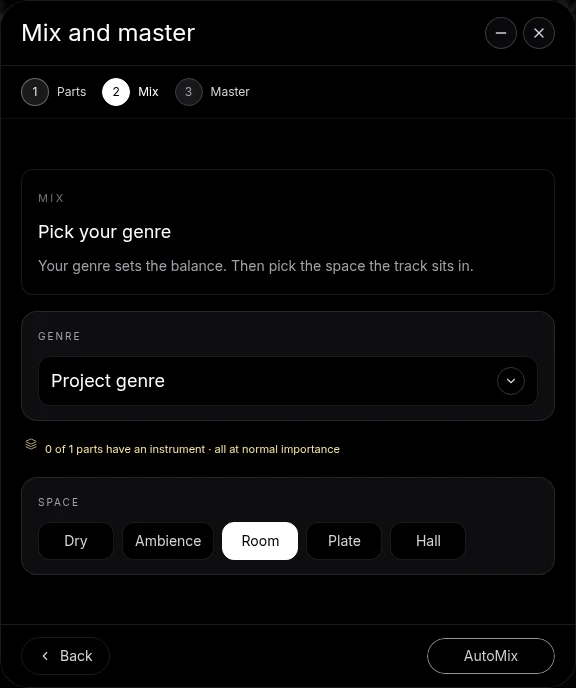
Making a song: Veena vs BandLab
| Read 20 Nov 2026 | Veena, free plan | BandLab, free plan |
|---|---|---|
| Start from a sentence | CoProducer builds the full song | SongStarter ideas, 3 per idea |
| Sections and arrangement | Planned and laid out for you | Built by hand |
| Tracks | No 16-track cap | 16 |
| Mix | AutoMix and Master project, free | AutoMix on Pro and Max |
| Vocal tuning | Auto-Tune with Key, Amount, Natural or Hard | 6 AutoPitch effects |
BandLab's real strength is its mobile app and community: its pages pitch "start on your phone, finish on your desktop". For writing, arranging and finishing the song, Veena gives you the producer and the studio free.
What's free in Veena
- CoProducer: a daily allowance of requests. Picking or skipping options does not use it.
- The studio: timeline, piano roll, Beat Maker, 61 instrument presets, mixer, recording, Auto-Tune and 4-stem separation, with no project limit.
- Together: real-time collaboration on every plan.
- Ownership: you own the Output you generate, with no watermark on any export.
Veena Pro, $20 a month, removes the daily request cap and unlocks the premium models.
How CoProducer builds a song walks through each stage, how to make a song covers the craft, and how to make a beat on BandLab starts with the beat. Every other answer is in the Veena help centre.
Make a 104 BPM pop song in A major: 4-bar intro, 8-bar verse, 8-bar pre-chorus, 8-bar chorus, 8-bar verse, 8-bar chorus, 8-bar bridge, 8-bar chorus, 4-bar outro. Punchy pop drums, a warm Electric Bass line, strummed Acoustic Guitar chords, a bright synth hook in the choruses and a soft pad under the bridge. Leave room for my vocal.
Related reading: Veena help centre · How CoProducer builds a song · How to make a beat on BandLab · Does BandLab have a vocal remover? · What can you do on BandLab without Membership? · Veena vs BandLab
Try this in Veena
Make a 104 BPM pop song in A major: 4-bar intro, 8-bar verse, 8-bar pre-chorus, 8-bar chorus, 8-bar verse, 8-bar chorus, 8-bar bridge, 8-bar chorus, 4-bar outro. Punchy pop drums, a warm Electric Bass line, strummed Acoustic Guitar chords, a bright synth hook in the choruses and a soft pad under the bridge. Leave room for my vocal.
Opens a new project in Veena, and CoProducer starts building from this prompt.
Frequently asked questions
How do you make a song on BandLab?
Open a Studio project, start from a SongStarter idea or a blank track, build the beat, add chords, bass and melody with virtual instruments, record vocals, arrange the sections, then mix and master. Veena is an AI DAW with a personal music producer built in. Describe the song you want and CoProducer builds it with you — beats, chords, melody, arrangement and mix — as real tracks you can edit, mix and export. Free, in your browser.
Can BandLab write a whole song for you?
It writes ideas. BandLab's SongStarter page offers "3 unique compositions for each song idea", opened as MIDI tracks in Studio (read 20 Nov 2026); the sections, arrangement and mix are yours to build. Veena's CoProducer builds the whole song: it plans the sections, writes each part, arranges them and gives the mix a finishing pass, all as tracks you edit.
How many tracks can a BandLab song have?
16 on the free plan and 32 on Pro and Max, per BandLab's pricing table (read 20 Nov 2026). A full song with drums, bass, chords, a hook, a pad, a lead vocal and harmonies fills that quickly. Veena's free plan has no 16-track cap, and every track exports as its own 24-bit WAV stem.
Can I make a song with a friend in real time?
Yes, in Veena, free on every plan. Send an invite link and your collaborator works on the same song with you in real time, in the browser. Each person gets a private CoProducer chat, and a shared chat builds for the whole session, so the producer is in the room with both of you.
Do I own the song I make in Veena?
Yes. Veena's terms say you own the Output you generate, and nothing you export carries a watermark. Write the song with CoProducer, record your own vocal over it, then export WAV 24-bit/48 kHz, MP3 320 kbps, MIDI or every track as stems, as often as you like, and release it wherever you want.
Meet your personal music producer
Free, in your browser. Describe the song you want and CoProducer builds it with you.
Make music free