How do I make music from my own recording?
How do I make music from my own recording? Bring the recording into Veena and ask CoProducer to build the song around it. Veena is an AI DAW with a personal music producer built in: CoProducer measures your take, its tempo, its downbeat and where each syllable lands, sets the project tempo to match and writes drums, chords and bass that follow your phrasing. A voice memo, a guitar riff or a hummed melody becomes a full song with your recording at the centre. It is free and runs in your browser.
Veena is an AI DAW with a personal music producer built in. Describe the song you want and CoProducer builds it with you — beats, chords, melody, arrangement and mix — as real tracks you can edit, mix and export. Free, in your browser.
Make music from your own recording in Veena, step by step
1. Open the studio. Go to daw.veena.studio, sign in with Google and double-click New Project.
2. Bring in your recording. Press Record and sing, hum or play, or press Upload and drop in a voice memo, a demo or a rehearsal take. The first imported clip can set the project tempo from its reading.
3. Hand it to CoProducer. Drag the clip into the CoProducer panel and describe the song:
Build a moody 86 BPM R&B song in C minor around my vocal recording: Trap kit drums with soft hats, Electric Piano chords with ninths, a warm 808 and a Vox Pad under the chorus. Follow my phrasing and leave space where I sing.
4. Choose each part. Every part arrives as 3 options. Each one is written against your take's phrasing, so the drums and chords leave room where you sing.
5. Arrange it. Ask "make an 8-bar intro before my vocal comes in" or "repeat the chorus at the end". Your recorded take stays in the song as CoProducer arranges.
6. Transform the take, if you like. Ask CoProducer to chop your guitar recording into a new groove, turn your humming into a cello line, or transcribe the melody to MIDI for the piano roll.
7. Mix and export. Ask CoProducer to mix and master the song, then choose Export for WAV, MP3 or stems.
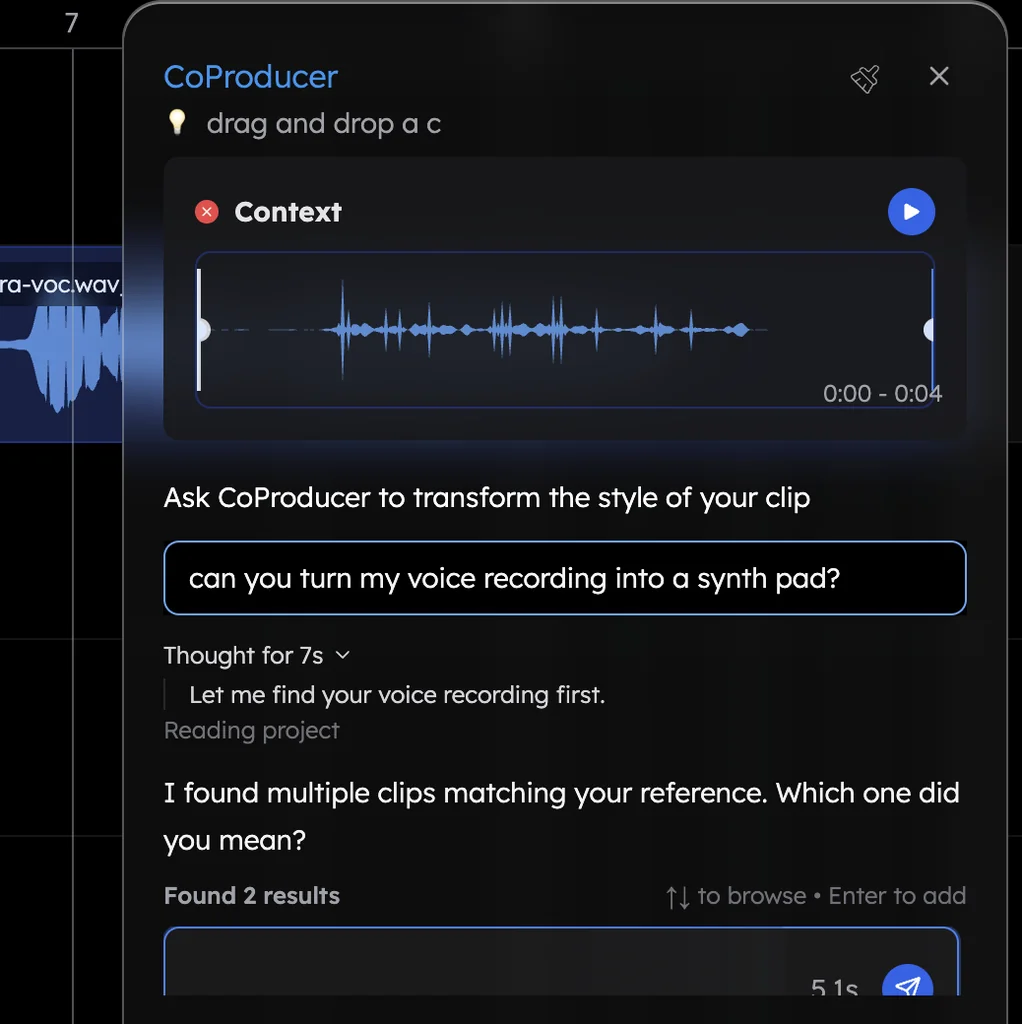
What CoProducer can do with your recording
| Your recording | Ask CoProducer | What you get |
|---|---|---|
| A sung idea or voice memo | "Build a pop song around my vocal" | Drums, chords and bass that follow your phrasing |
| A hummed melody | "Turn my humming into a cello line" | Your melody played by the instrument you named |
| A hummed or played melody | "Transcribe this to MIDI" | Editable notes in the piano roll |
| A guitar or piano riff | "Chop my riff into a new groove for the chorus" | New clips cut from your own audio |
| A finished demo | "Split this into stems and rebuild the drums" | Vocals, drums, bass and other on their own tracks |
What's free
- Recording and import: microphone recording with calibration, and 13 audio formats plus MIDI and video.
- CoProducer: a daily allowance of requests. Picking or skipping options does not use it.
- The studio: timeline, piano roll, Beat Maker, mixer, stem separation and 17 built-in effects, with up to 5 projects at a time.
- Export and ownership: WAV, MP3, MIDI and stems with no cap and no watermark; your recordings stay yours.
Veena Pro, $20 a month, removes the daily request cap and unlocks the premium models.
Reason is a desktop DAW for Mac and Windows at $299, with AI stem separation and mastering only on its $169-a-year Reason+ subscription (as of October 2026). Veena puts a producer in the session who listens to your take first and writes every part around it, free, in the browser.
For backing music under a spoken or sung take, read add background music to your voice recording. The recording tools are in recording in Veena, how the build works is in how CoProducer builds a song, and the one-page version is the AI backing track generator. Every other answer is in the Veena help centre.
Related reading: Add background music to your voice recording · Recording in Veena · How CoProducer builds a song
Try this in Veena
Build a moody 86 BPM R&B song in C minor around my vocal recording: Trap kit drums with soft hats, Electric Piano chords with ninths, a warm 808 and a Vox Pad under the chorus. Follow my phrasing and leave space where I sing.
Frequently asked questions
How do I make music from my own recording?
In Veena, record your idea or drop in a voice memo, drag the clip into the CoProducer panel and describe the song. CoProducer measures your take's tempo, downbeat and phrasing, sets the project tempo to match and writes drums, chords and bass around it. Veena is an AI DAW with a personal music producer built in, free in your browser.
Can I turn a voice memo into a full song?
Yes. Upload the voice memo to Veena, or record straight into the studio, and ask CoProducer to build a song around it. Every new part reads where your syllables land, so the drums and chords leave room for your voice, and your take stays in the song as CoProducer arranges it.
Can I turn my humming into an instrument?
Yes. In Veena, record yourself humming and ask CoProducer to "turn my humming into a cello line in the song's key". It re-voices the take as the instrument you name, or transcribes it to editable MIDI notes in the piano roll if you ask for MIDI. Both start from your own melody.
What recordings can I build music from?
Anything you recorded or have the rights to rework: a sung idea, a guitar riff, a beatboxed groove, a rehearsal take or an old bounce. Veena imports WAV, MP3, M4A, AAC, OGG, OPUS, FLAC, AIFF and CAF, plus video files, and runs no copyright filter second-guessing your own audio.
Meet your personal music producer
Free, in your browser. Describe the song you want and CoProducer builds it with you.
Make music free