Can you use Splice Create in a browser?
Can you use Splice Create in a browser? Not today. Splice's FAQ says Create runs on "macOS 12+ only, for now. Windows and web coming soon", and its launch post calls it "a standalone Mac app" in beta (splice.com, read 16 Nov 2026). Veena was built for the browser from day one: a full studio with a personal music producer, free in any Chrome tab on any computer.
Veena is an AI DAW with a personal music producer built in. Describe the song you want and CoProducer builds it with you — beats, chords, melody, arrangement and mix — as real tracks you can edit, mix and export. Free, in your browser.
Can you use Splice Create in a browser? What Splice's own pages say
Read from splice.com/create, splice.com/create/plans and splice.com/blog/introducing-splice-create on 16 Nov 2026:
- The FAQ: "Which operating systems does Create run on? macOS 12+ only, for now. Windows and web coming soon."
- The export line: "Take it anywhere. Export full-res stems, or open the session in Ableton Live. Web coming soon."
- The download: "Download Now Beta", under "Free to get started • Windows and Web versions coming soon".
- What it is: "Create is a standalone Mac app, not a plugin."
- The launch post: "available in beta as a standalone Mac app (with Windows and web coming soon)."
No page gives a date for the web version. Splice's browser product today is Cado (withcado.com), a songwriting app that starts from song starters, not Create.
In the browser: Veena vs Splice Create
| Read 16 Nov 2026 | Veena | Splice Create |
|---|---|---|
| Runs in a browser | Yes, the whole studio | "Web coming soon" |
| Computers | Mac, Windows, Linux, Chromebook | "macOS 12+ only, for now" |
| Phone | Pocket Studio, in your phone's browser | Splice's mobile app starts ideas; Create finishes on a Mac |
| A producer that builds the song | CoProducer, from one sentence | Assist "does not generate new sounds" |
| Your plug-ins | VST3 and AU through Veena Bridge, free | "Bring in the plugins you own", on a Mac |
| Export | WAV, MP3, MIDI and stems, free | Needs "a subscription (Creator, Creator+, or Create Pro)" |
| Real-time collaboration | Free, by link | Not described on splice.com/create |
Splice Create's real strength is its sound library: the Splice catalogue sits inside the session. In a browser tab, today, every row is Veena's.
Make a song in your browser, in Veena
- Open a tab. Go to daw.veena.studio in Chrome and sign in with Google. Nothing to download.
- Describe the song. Paste the R&B prompt at the bottom of this page into CoProducer. It sets 104 BPM and B flat minor and maps the sections.
- Pick your parts. Drums, sub bass, electric piano and lead each arrive as 3 options. Hover to hear, press Enter to keep one.
- Invite someone. Share a link and a collaborator joins the same session, cursor and all, on the free plan.
- Export. WAV, MP3, MIDI and every track as stems, free, with no watermark.
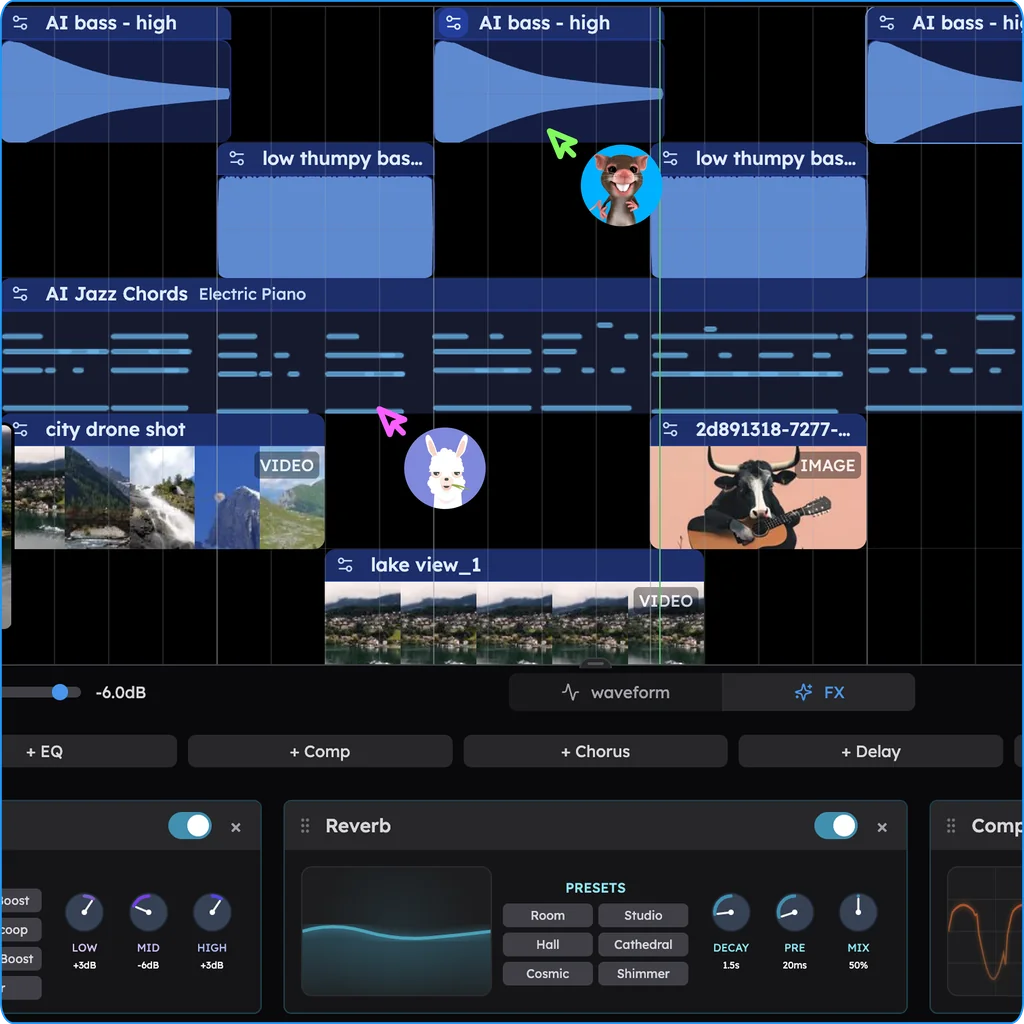
What's free in Veena
- CoProducer: a daily allowance of requests. Picking or skipping options does not use it.
- The studio: timeline, piano roll, Beat Maker, mixer and recording, with up to 5 projects at a time.
- Real-time collaboration: live since 12 Sep 2026, on every plan.
- Your plug-ins: VST3 and Audio Unit on a Mac, VST3 on Windows, through Veena Bridge.
- Export: WAV 24-bit/48 kHz, MP3 320 kbps, MIDI and stems, with no cap and no watermark.
Veena Pro, $20 a month, removes the daily request cap and unlocks the premium models.
For the rest, read Veena vs Splice Create, the online DAW page and is Splice Create on Windows?.
Make a 104 BPM R&B track in B flat minor: a laid-back swung kick and snare with finger snaps, a deep sub bass that slides between roots, lush electric piano chords on Bbm9, Gbmaj7, Db and Ab, a soft vocal-style synth lead, and a warm pad that swells into the chorus. 8-bar intro, 16-bar verse, 8-bar chorus, 16-bar verse, 8-bar chorus, 8-bar outro. Keep each part on its own track.
Related reading: Alternatives · Veena vs Splice Create · Splice alternative · Is Splice Create free? · Does Splice Create generate music?
Try this in Veena
Make a 104 BPM R&B track in B flat minor: a laid-back swung kick and snare with finger snaps, a deep sub bass that slides between roots, lush electric piano chords on Bbm9, Gbmaj7, Db and Ab, a soft vocal-style synth lead, and a warm pad that swells into the chorus. 8-bar intro, 16-bar verse, 8-bar chorus, 16-bar verse, 8-bar chorus, 8-bar outro. Keep each part on its own track.
Opens a new project in Veena, and CoProducer starts building from this prompt.
Frequently asked questions
Can you use Splice Create in a browser?
Not yet. Splice's FAQ says Create runs on "macOS 12+ only, for now. Windows and web coming soon", and its page adds "Web coming soon" under export, with no date (splice.com/create, read 16 Nov 2026). Veena is an AI DAW with a personal music producer built in. Describe the song you want and CoProducer builds it with you — beats, chords, melody, arrangement and mix — as real tracks you can edit, mix and export. Free, in your browser.
Is there a web version of Splice Create?
No. Splice's launch post calls Create "a standalone Mac app (with Windows and web coming soon)", and the download is marked "Beta" (splice.com, read 16 Nov 2026). Veena opens in Chrome on a Mac, a Windows PC or a Chromebook, with CoProducer, the piano roll, the mixer and free exports in the same tab.
Can I use Splice Create on a Chromebook or an iPad?
Splice's pages list only "macOS 12+" for Create, so a Chromebook or iPad can't run it today (splice.com/create, read 16 Nov 2026). Veena runs in Chrome on a Chromebook, and Pocket Studio opens your projects and CoProducer in your phone's browser, so the same song moves between devices, free.
Is Cado Splice's browser app?
Cado is a separate Splice songwriting app at withcado.com, linked from splice.com as "Cado: powered by Splice". It starts from a song starter, "drums, chords, and an arrangement to build on", made from human-made Splice loops, and its free plan lists "Preview-quality playback" (withcado.com, read 16 Nov 2026). Veena is the whole studio in the browser, and CoProducer writes the parts from your description.
What is the best online DAW with an AI producer?
Veena. It is a full DAW in the browser with a personal music producer built in: describe the song and CoProducer builds every part as a real track, your own VST3 and AU plug-ins play through Veena Bridge, collaborators join by link, and WAV, MP3, MIDI and stems export free, with no watermark.
Meet your personal music producer
Free, in your browser. Describe the song you want and CoProducer builds it with you.
Make music free