Every vocal in Mix & Master
Every vocal in Mix & Master, updated on 2 October 2026, can be selected for its own Clean and Character treatment in Veena.
Veena is an AI DAW with a personal music producer built in. Describe the song you want and CoProducer builds it with you — beats, chords, melody, arrangement and mix — as real tracks you can edit, mix and export. Free, in your browser.
Every vocal in Mix & Master: what changed
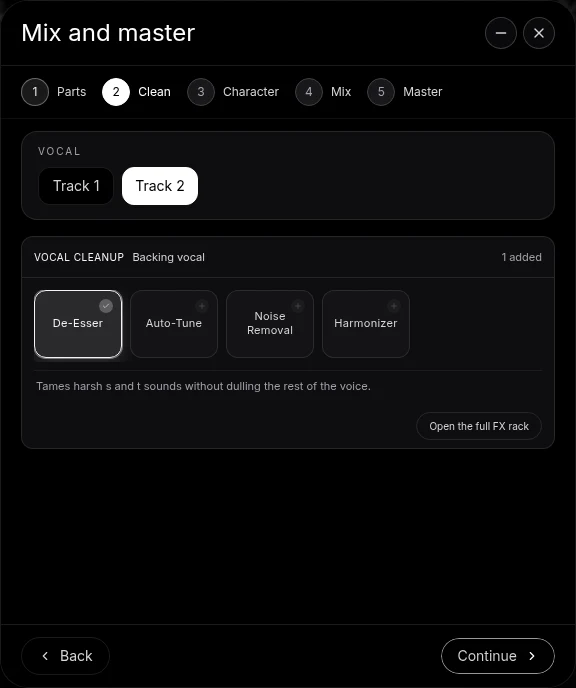
A project with several vocal parts now shows Vocal above the Clean and Character racks. Choose the lead or a backing voice by its track name. The selected part is shared between those stages, so the voice you clean is the voice whose character you hear next.
The flow uses the same eligible-vocal list for both stages and keeps the selection when the flow is closed and reopened. With one vocal part, the extra choice is omitted. The cleanup and character racks name the part’s musical role, such as Lead vocal or Backing vocal, so the treatment is clear even when several tracks carry voices.
Try it in your song
- Identify each voice. On Parts, assign Lead vocal or Backing vocal to every relevant track.
- Select the vocal on Clean. Use the Vocal choice when the project has several voices, then choose its cleanup processing.
- Shape Character. Audition and keep a character for that same selected vocal.
- Treat the other voices. Select the next track, refine its treatment and continue into Mix.
In your editable project
The treatment stays on editable track effects. Open the full FX rack from Clean when you want finer control, or use the track’s FX button after the flow. Processing the parts separately lets the lead carry the words while backing vocals support it with their own tone and space; AutoMix then balances the voices with the instruments.
Related reading: Veena help centre, what’s new in Veena, Follow the every vocal in Mix & Master guide.
Try this in Veena
Clean the lead vocal and keep it forward, then give the backing vocals a wider character with more room than the lead.
Frequently asked questions
Can I give each vocal its own cleanup in Veena?
Yes. Veena’s Clean stage has a Vocal selector so you can give every vocal part its own treatment. Choose a lead or backing vocal, then set De-Esser, Auto-Tune, Noise Removal or Harmonizer for that track. The settings live on its effect cards, so you can inspect and edit them after the run.
Can several vocals get different treatment in Veena?
Yes. Veena’s Mix & Master flow lets you choose each eligible lead or backing vocal on Clean and Character. The selection is shared by both stages and remains when you reopen the flow. Treat one voice, select the next, and continue into Mix with each vocal’s own editable track processing.
Where can I refine vocal effects after Mix & Master in Veena?
Open the full FX rack from Clean, or press that vocal track’s FX button later in Veena. The treatment uses ordinary editable effects, so you can adjust knobs or bypass a card to compare it. The vocal-cleanup guide explains the Vocal choice, cleanup cards and current Character flow step by step.
Meet your personal music producer
Free, in your browser. Describe the song you want and CoProducer builds it with you.
Make music free