Udio vs Veena: Inpainting vs Real Tracks You Keep
Udio vs Veena: Udio's Inpaint re-rolls songs you can't download (off since Oct 2025). Veena builds real tracks you edit, own and export, free in a browser.
Udio vs Veena is a generator you can only listen to against a studio you keep. Udio generates songs and, since 29 October 2025, lets no one download them; its fixes, such as Inpaint, create two new songs each time. Veena is a free AI DAW where CoProducer builds your song as real tracks you edit, own and export.
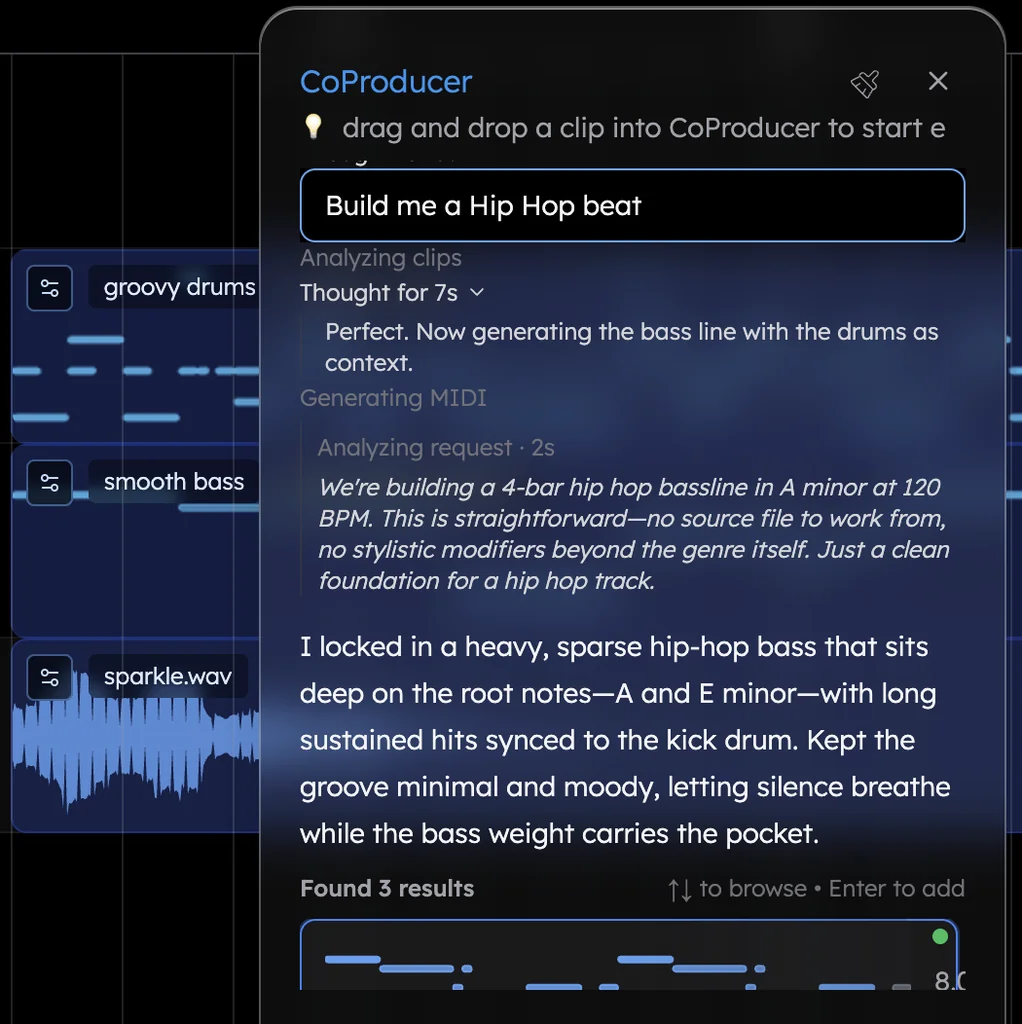
Veena is an AI DAW with a personal music producer built in. Describe the song you want and CoProducer builds it with you — beats, chords, melody, arrangement and mix — as real tracks you can edit, mix and export. Free, in your browser.
All Udio facts below come from Udio's own blog, help centre and terms of service, read on 23 September 2026.
Udio vs Veena at a glance (September 2026)
| Veena | Udio | |
|---|---|---|
| What you get | Real tracks on a timeline: drums, bass, chords, melody | A rendered song, heard on Udio |
| Changing one part | Edit that track, in plain words or in the piano roll | Inpaint or Edit: "two new songs are created" each click |
| Downloading your song | Every plan, no cap: WAV 24-bit/48 kHz, MP3 320 kbps, MIDI | Disabled since 29 Oct 2025 |
| Stems | 4-stem separation, plus every part already on its own track | "Downloading of audio, video, and stems has been disabled" |
| Ownership | "You own the Output you generate" | Udio or its licensors "own and will continue to own" it |
| Releasing it | Yours to release | Forbidden on YouTube, TikTok, Spotify and SoundCloud |
| Free plan | The whole studio, with a daily CoProducer allowance | "Three 130-second songs per day" |
| Unused credits | Veena Pro credits roll over while you stay subscribed | Subscription credits "don't rollover from month to month" |
Fixing one bar: Inpaint vs a real track
Say the bassline in your second chorus clashes with the chords for two bars. Here is the fix in each.
In Udio, you click Inpaint on that section. Udio's help centre is exact about what happens next: "Every time you click 'Create', 'Extend', 'Remix', 'Inpaint' or 'Edit,' two new songs are created", and credits are spent on them. You get two new songs, keep one or click again. You don't edit the bass line; you regenerate the song and listen for a better one. And when it finally sounds right, the song still can't leave Udio.
In Veena, the bass is its own track, written by CoProducer as MIDI notes. You have three ways in:
- Tell CoProducer. Highlight bars 9 to 10 of the bass and type "follow the chord roots here". CoProducer edits only the highlighted region, and nothing else in the song moves.
- Edit it yourself. Double-click the clip, open the piano roll, and drag the two wrong notes to the root. Ctrl+↑ or Ctrl+↓ moves notes an octave if the line sits too high.
- Swap the sound instead. Keep the notes and ask for "a rounder 808" or "a picked electric bass"; the part keeps its notes and changes its sound.
Whatever CoProducer changed, one undo reverses it. That is the difference between a producer and a slot machine: you decide exactly what changes, and everything else stays where you left it.
What you can take with you
This is where the two stop being comparable. Udio's CEO wrote on 29 October 2025: "Starting today, downloads from the platform will be unavailable." Its terms (last revised 12 November 2025) say "You may not download copies of any Output", forbid putting it on "any streaming platform or user generated content platform (e.g., YouTube, Facebook, Instagram, TikTok, Spotify, Soundcloud and similar platforms)", and limit you to "personal and non-commercial purposes".
In Veena you export the full mix or every track as stems, in WAV 24-bit/48 kHz, MP3 320 kbps or MIDI, plus MP4 when the project has video, as often as you like, with no watermark on your exports. Split any finished track into vocals, drums, bass and other with the stem splitter. And the song is yours: "you own the Output you generate through your use of the Service."
What each costs
Udio's help centre lists Standard at $10 a month and Pro at $30 a month. Subscription credits don't roll over, and a 7-day trial you forget to cancel charges "the full price of an annual subscription" unless you switched it to monthly: $96 plus tax for Standard in the US. The free plan gives 10 credits a day plus an extra 100 a month, and "only three 130-second songs per day".
Veena's studio is free: CoProducer with a daily allowance, the timeline, the piano roll, stems, your own VST and AU plugins through the Veena Bridge, real-time collaboration and exports with no cap. Veena Pro is $20 a month, billed monthly only: it removes the daily request cap and unlocks the premium models, and unused credits roll over while you stay subscribed.
A Veena session, start to finish
- Open Veena and sign in with Google.
- Paste the trap prompt at the end of this post. CoProducer sets 140 BPM and F sharp minor and maps the hook, verses and outro.
- Pick your drums from three options, then your 808 from three, written to follow the kick you chose. Then the bells and the pad.
- Record your verse over it, or hum a melody and turn it into an instrument.
- Export the beat and every track, and keep them.
In Veena's own data, first requests that ask for trap get a finished first result on day one 83.6% of the time.
Verdict: Veena
Udio's Inpaint makes regenerating a smaller job. It is still regenerating, and what you make stays on Udio. Veena gives you the parts, the edits, the file and the ownership, free, with a personal music producer building the song alongside you. For the full switching guide, read the best Udio alternative; for the rest of the generators, start with our Suno alternative guide.
Related reading: What Udio cannot do · The best Udio alternative · Veena vs Suno · Make a song with AI
Try this in Veena
Make a 140 BPM trap beat in F sharp minor: a rolling 808 that follows the kick, crisp hi-hats with triplet rolls, a sharp clap on beat 3, a dark bell melody and a soft pad underneath. Intro 4 bars, hook 8, verse 16, hook 8, verse 16, hook 8, outro 4.
Frequently asked questions
What is the difference between Udio and Veena?
Udio generates songs you can play on Udio but, since 29 October 2025, cannot download, and every edit generates two new songs. Veena is an AI DAW with a personal music producer built in: describe the song you want and CoProducer builds it with you as real tracks you can edit, mix and export. Free, in your browser, and you own what you make.
Is Udio's inpainting the same as editing a track?
No. Udio's help centre says every click of Inpaint, like Create, Extend, Remix or Edit, creates two new songs and spends credits: you regenerate a region and listen to what comes back. In Veena every part is its own track, so you change the bass or one chord directly, in plain words to CoProducer or in the piano roll, and one undo reverses it.
Can I move my Udio songs into Veena?
Not as files: Udio's terms say "You may not download copies of any Output", so your Udio songs stay on Udio. Rebuild the ones you love in Veena instead: tell CoProducer the tempo, key, genre and instruments, pick from three options for each part, record your own vocal, and export every track whenever you like.
Is Veena free?
Yes. Veena's free plan includes the whole studio: CoProducer with a daily allowance, the timeline and piano roll, 4-stem separation, your own plugins, real-time collaboration and exports with no cap. Veena Pro, $20 a month, removes the daily request cap and unlocks the premium models. Udio's free plan allows three 130-second songs a day and no downloads.
Do I own the songs I make in Veena?
Yes. Veena's terms say "you own the Output you generate through your use of the Service", on every plan, and there is no watermark on your exports. Udio's terms say Udio or its licensors "own and will continue to own" the Output, which you may use only for personal, non-commercial purposes.
Meet your personal music producer
Free, in your browser. Describe the song you want and CoProducer builds it with you.
Make music free